I have one of these in a new Ryzen 5000 build (that also has 3200Mhz ECC RAM! In a workstation!). The latency and throughput are impressive. What a time to be alive where SSDs are doing 5-8 GB/s with low double digit microseconds. At home the bottleneck is obviously my network, but even in a data center you’d need 100Gb networking in order for the network to not be the bottleneck. I really hope these hardware trends continue and we start to see a paradigm shift to more local processing/storage.
I've started to upgrade parts of my network to 10Gbps, and it was surprisingly affordable. My NAS and server now have a dedicated 10GB Gbps link between them (the NAS also has 4 1Gbps connections to my primary network), and it only cost about £50. Obviously it still could be a bottleneck, but it's a decent step in the right direction.
I've been looking at doing this at home with the Mikrotik CRS305-1G-4S+IN. I honestly don't have a need for it right now, but just knowing that it's possible makes me want to go for it...
I just started doing a large overhaul (first in 10 years), and moving to 10GbE was a pretty big deal. When your storage is fast, waiting for the network is the real bottleneck. Uploading things on a WAN link (I have 1Gbps down, but only 40-50Mbps up) is the new drag.
For video editing I can use the SSDs on the workstation, though I can also saturate the 10GbE connection to an iSCSI target on a Synology full of hard disks in RAID 10.
Want to provision a new virtual machine? I have some 1L form factor computers (Some 175x175x35mm HPs with 8-core Ryzen 7 PRO APUs that sip 12-15W at idle) in an XCP-NG cluster. Build an image and provision it quickly. I'm a bit limited here as USB 3 NICs tend to cap out at 3.5Gbps because the top of the controller's block diagram is a 3.2 Gen 1, but when USB Type-C Gen 2 NICs hit they'll rip along at around 7-8Gbps, pulling large built images down from the Synology and writing it to their SSDs (980 Pros) in well under 10 seconds.
Scary stuff though is the virtualized Spark cluster running on my workstation. Four Intel D7-P5510s in RAID10. With ~25GB/sec of sequential reads you're not held up by storage anymore. Just the network when you want to write out results, and any suboptimal code to ensure you don't starve the CPU cores because you're not ripping through memory fast enough.
I've got some Mellanox cards for about 20-30 USD each, some direct attach cable can be had for a few dollars as well. Later I picked up some cheap optical gear from FS[1] for when I moved my NAS into another room. About $20 for the transceivers and fiber cable was not expensive either.
Regular 1GbE is sooo low now.
Not got the switch yet, just running point to point. Using a different IP range so I'm sure I'm hitting that 10G goodness.
hardly anything, old mellanox NICs are practically free on eBay, DACs and 10g optics are a pittance. Even DC 10g switching is cheap.
Franky, 100ge is within home budgets now.
I'm right in the middle of a huge home network/storage upgrade myself, although I'm making a slightly bigger jump.
I've got a fairly extensive home lab network but I've been "stuck" at 1 GbE for several years now, mostly because I couldn't justify the cost of upgrading to 10 GbE. See, I'd need a switch with a minimum of five 10 GbE ports -- just for the FreeNAS box, my workstation, and three of the VMware nodes; if I were gonna make the jump to 10 GbE, I'd want to upgrade those machines, at the least.
A couple years ago I bought a pair of cheap, old Mellanox 10 GbE cards and a short direct-attach cable (DAC) to directly connect the FreeNAS machine and the "giant" VMware box (which has roughly the same "horsepower" of three of the others combined!) that I ran most things on. For the most part, everything else has a single 1 GbE link, except for my workstation (2 x 1 GbE) and the other VMware servers (4 x 1 GbE).
Anyways, I recently started thinking about upgrading and/or replacing some things. While doing my research, I came across recommendations for some specific (enterprise) network gear that -- having been mostly a Cisco / Juniper guy for the last 15 years or so -- I wouldn't have normally considered (and, no, MikroTik is NOT an option, for several reasons). I also learned a few "interesting" pieces of information, like how to magically turn some specific (relatively cheap) 10 GbE NICs into (not so cheap!) 40 GbE NICs just by flashing different firmware on them.
I also ended up getting a set of server rails and a small box full of dual-port 10 GbE NICs "free" when I went to buy the set of rails from a guy off Craigslist. They were Broadcom NICs but they'll work just fine in the other VMware servers!
So, by the time I'm done with everything (I'm also in the process of building a new room in the basement just for the lab), my FreeNAS box and workstation will both be connected at 40 GbE and the half-dozen or so other servers will all be connected at 10 GbE (although, to be honest, I will very likely end up connecting the second 10 GbE ports on them all, too; I'll have enough 10 GbE ports left on the switch.).
Before any asks, I'm not sure how much I've spent on the upgrade (and I'm halfway afraid to total it all up, honestly!). I've almost certainly spent more than I had originally planned when first starting to think about doing all of this but: 1) the additional cost to go to 40 GbE on the storage box and my workstation was really that much more so it was easy to justify, 2) once I'm all done with everything, I'm gonna get rid of the "giant" VMware box and, quite likely, a few of the others -- and maybe even some of the other things I've forgotten I have and/or don't use anymore; that should make the total overall cost fairly neglible, and 3) I've got 40 gigabit at my house!
Of course, at this point, the storage server won't be able to come close to saturating the 40 GbE link... which means I'll need to add more, faster storage... rinse and repeat, it never ends! Just say no to home labs, kids!
I did it one year ago and have to turned it off to use trunk 4 gbps ... too noisy. Except macmini and the nas ... the router and switch just annoying noise.
I have a Ryzen 2600 with an Asus B450-Plus motherboard, and recently tried to upgrade to 3200MHz DDR4 (from 2666MHz) - I used the DRAM calculator (which is quite confusing TBH), but no matter I tried, it wouldn't even boot at anything higher than 2666MHz @CL16. A bit disappointing, but I still ended up with more RAM overall, so not a disaster.
This isn’t the right drive for that, though. Outside of provisioned storage for VMs, these SSDs are simply too small to have much use in a network setting.
Meta, web page implementation note, in the hope that someone at AnandTech will pick it up (or that anyone else can learn from it):
The many-in-one diagrams let you switch between different diagrams by clicking on a label. However, the technique that has been used is inferior, making it not obvious (difficult to find), a bit more difficult for touch input, and impossible for users of accessibility tools or those not executing JavaScript.
The most important problem with this is that the table cell can be clicked on, but can’t be focused. You should roughly never have a click handler on a non-focusable element, focusable meaning elements like <a href>, <button>, <details><summary> or something with a tabindex="0" attribute. (But note that just adding tabindex="0" would not be sufficient, because onclick wouldn’t be triggered on pressing the Enter key. On links and buttons it does, because onclick is a misnomer for them, firing on activation rather than mouse click.)
This would be far better markup, probably paired with style adjustments to shift the table cell padding to the anchor, and making that anchor `display: block`:
That way, (a) the link works without JavaScript, opening the requested diagram in a new window; (b) with JavaScript, it behaves as previously, except that it’s now focusable, so users of screen readers can interact with it; (c) as a link, it’s more discoverable (e.g. hover and it’s obviously interactive, where with the current one, I was just guessing based on the framing that maybe it was interactive despite all the signs telling me it was just text); (d) as a link, tapping on a touch screen will work more reliably (the browser will be more inclined to interpret a tap that moved slightly as a click rather than panning).
One other thing I just noted: them http: URLs should be https:.
I'll give these suggestions a try. I can't promise I'll be able to use all of them, because our site uses a disgustingly archaic CMS that's as likely to mangle markup as not (hence why I haven't even attempted to do the graphs in SVG or anything like that). The publisher's IT dept really only cares that the ads still show up in enough places, not about giving us a useful tool to work with.
> The publisher's IT dept really only cares that the ads still show up in enough places, not about giving us a useful tool to work with.
That's really unfortunate, because your technical content is among the, if not the very best in the business. But clearly there hasn't been much investment into the presentation side over the last years.
There's this German hardware review site [1] that has an almost embarrassingly good system for graphs like this, I'm sure you are aware of it. Would be really amazing if we could somehow get that level of presentation for your content!
It's rare to find real-world workloads that stress SSDs like these synthetic benchmarks. It's mostly a problem with synthetic benchmarks.
Heatsinks like the big chunk of metal in that video are only really good for delaying thermal throttling by adding extra thermal mass. The drive will still hit 100C and still throttle if you push it hard enough. Only airflow will remove heat from the drive.
If someone has workloads that are so consistently intense that throttling is causing an impact, they probably shouldn't be using consumer drives anyway. Server grade drives are designed for sustained workloads.
When your drive can sustain 7GB/sec read speeds and 5GB/sec write speeds, you can read an entire 1TB drive in about 2.5 minutes and write the entire drive in 3.5 minutes. Throttling will kick in after a minute or two, but the bigger problem is that if you're doing this consistently you're going to exhaust the drive's 600TBW write endurance very quickly.
In theory, if throttling wasn't an issue you could consume the entire drive's write endurance in a matter of days. If you're doing that level of writing, it's time to upgrade to more appropriate hardware.
You're starting to get into (battery-backed, if you need persistence) DRAM territory for those sorts of workloads. And you'll pay for it, but it's going to last a lot longer.
A good heatsink should do more than that. You add more surface area and therefore more air with your existing airflow passing over more metal to transfer more heat from the drive at a time. It's not just a sponge for heat, they are designed to shed it as well with their fins to maximize surface area exposed to air.
The problem with that kind of test is the "within minutes of testing" bit. You can't keep a drive this fast 100% busy for multiple minutes in a row unless you have specifically set out to create a workload to torture the drive.
I built a computer 2 years ago to do some database cleanup. Part of the regular process is to restore a database from a compressed backup to a terabyte data file, it works fine on S750 but it always gets in thermal throttling on a Samsung Evo Plus 870, all with heatsinks and good airflow (rackmount case with many chassis fans). Restoring 1TB at 1.7GB/sec takes enough time to get into trouble and this is regular work done almost daily, not a test.
I plan to build a second computer for this work, but this time with PCIe v4 SSDs; this is to expand capacity, not because I think it will have less problems or be faster overall, a throttled disk is painfully slow.
That doesn't sound like thermal throttling. That sounds like you're running out of SLC cache space and writing at TLC speed, minus the overhead of the drive flushing the SLC cache in the background while you're still writing more data.
The solution is to get an enterprise drive, because they don't use SLC write caching and can usually sustain somewhat better write speeds as a result (plus, they're generally rated for more write endurance).
Except that the transfer speed and drive temperature are linked together, we checked many times. If I do the same operation on 2 drives from 2 vendors and one works just fine and the other one shows 15 degrees C more on the same workload that almost fills and entire drive, what has SLC to do with this?
Without knowing exactly what two drives you're comparing, I can't give you a clear answer. But it still sounds like you're deciding that the temperature is the cause of the performance difference, without having any evidence to rule out the possibility that the your temperature and performance observations are two different consequences of an underlying hardware difference between the two different drives.
If one doesn't want to buy the official RGB-colored gaming model with the samsung heatsink on it, and you know what the vertical clearance is above your M.2 slot on a motherboard, it's totally possible to buy your own low cost small aluminum heatsinks and stick them on with heatsink adhesive. Not very different from the cheap aluminum heatsinks you see people putting on the CPU of a raspberry pi.
Sufficient airflow across the motherboard is also important, of course.
How are they able to predict that the drive should last 5 years without having it running for 5 years? I mean how do they know the curve of degradation of components over such time?
(I have been using this drive for few months now - it is amazing - but WD seem to be new in the game and couple of years ago I had a WD drive die on me, so not so great memories)
Unless you encounter a firmware bug that causes premature death of a drive, the wearout of a SSD is pretty predictable and is based on the volume of data written rather than time elapsed. NAND flash memory has limited write endurance, and that can be measured by testing individual dies far more quickly than testing an entire SSD to death.
Based on known program/erase cycle limits for the NAND they're using, SSD manufacturers can make pretty accurate projections for how long (in TB written) the drive as a whole can survive, accounting for how that drive's controller manages the flash and what kind of write amplification can be expected from the intended workloads.
The most significant limitation where manufacturers have to go out on a limb with their projections pertains to the standard requirement that a consumer SSD needs to be able to retain its data in a read-only state for a year after reaching the end of its rated write endurance. NAND manufacturers can very quickly bring flash to that level of wear, but they can't wait a year to measure retention characteristics before shipping. So they make projections based on high-temperature accelerated testing.
The performance is also impacted by the write pattern. Drives endurance numbers are for 4 KB random writes on a drive that was preconditioned with 1 or 2 full overwrites. The only workload that is worse is 512 byte random writes (I think). This workload causes a lot of garbage collection (compacting 4 KB pages into e.g. 1 MB blocks) to allow blocks to be erased so that new pages can be written. This contributes to more program/erase cycles than you would expect ("write amplification factor").
Increasing over-provisioning, as I suggested in another comment, allows garbage collection to run less frequently and reduces the write amplification factor. Sequential large writes will also reduce write amplification factor. Rewriting blocks that are only in DRAM cache or dynamic SLC will also reduce wear.
so if you use the 500GB drive and download e.g. 1TB of torrents per day, the write endurance predicts your drive will last less than a year, on average
I wonder if there will come a cloud provider that solely uses consumer grade compute, local storage, and internal networking, with some kick ass network connectivity and steal the cloud provider show?!
Most applications that run on AWS and GCP don’t really need that premium Xeon/EPYC CPUs, enterprise-grade storage that is 10X the cost of consumer grade drives. Of course, those that do may justify the premium cost. But, the rest that just runs a few web servers behind a load balancer and non-critical services could use stuff on the cheap...
Say cheaper digitalocean built upon bare metal consumer grade hardware - Ryzen CPU, consumer grade memory, this Local NVMe storage, and the onboard network card... may be I am crazy to think that’s enough.
Heck such hardware may even perform better than several enterprise grade VMs provided by cloud providers.
> I wonder if there will come a cloud provider that solely uses consumer grade compute, local storage, and internal networking, with some kick ass network connectivity and steal the cloud provider show?!
Forget consumer grade: even normal Dell/HP/Supermicro stuff is a PITA to run at datacenter scale. Most major cloud providers roll their own machines for a reason.
I'm guessing any hardware savings would be evaporated by increased labor, power, and footprint costs, likely making you more expensive than other providers.
“Knowing what you are doing” — yes, and what they are doing is throwing more labor, more machines and more electricity at the problem than either Google or Facebook ever would.
Major cloud providers got off “commodity enterprise” over a decade ago. There’s a reason for that.... the stuff is just bad.
With today's tech, it doesn't make sense. I'll try to explain:
> consumer grade compute
Non-ECC compute is a no go from start. You won't believe how computers make mistakes when they're driven to their limits. Even with good cooling, frying RAM, CPUs and ethernet gear is ordinary events.
> local storage
Consumer grade HDDs are slow. SAS is not consumer grade. Consumer grade SSDs cannot handle the write cycles. The ones which can handle neither cheap nor consumer grade.
> internal networking
Gigabit ethernet is cheap but, is not fast enough anymore. 10Gig+, Infiniband and other stuff needs reliable high bandwidth PCIe, which is not in abdunance in consumer grade hardware.
You need more lanes, then we come to next point.
> Most applications that run on AWS and GCP don’t really need that premium Xeon/EPYC CPUs
Server CPUs are not about processing power all the time. Reliability, PCIe lanes, expansion and advanced virtualization which allows that high performance network to be connected in abundance and shared between VMs without performance penalties. So you can scale the number of jobs running on less hardware in smaller spaces.
> enterprise-grade storage that is 10X the cost of consumer grade drives.
Again, it's not about performance but about reliability at least half the time. Performance is required to be able to scale, not for independent jobs.
I deal with servers for HPC use. Let me explain why I made my question...
Consumer boards for Ryzen CPUs support ECC RAM these days. So, it's not as bad as you think. Is it as reliable as a server board? probably not.. But, I'm not building for or paying for that reliability either - fitness for purpose.
I think your comment on storage missed the whole point. The article was about a PCIe 4.0 SSD that I wished to use in servers. They are every bit as fast as the enterprise grade NVMe drives. The differentiation is typically power loss protection. At consumer grade service levels, I don't care, I go cheap, but insane value. Again, fitness for purpose.
Networking. I can find a Asus board for Ryzen CPUs with onboard 10G NICs.
Sure, server CPUs have more lanes etc and are designed for maximum load sharing across workloads. My quest is the opposite. Give me small, cheap, and insane value servers instead of VMs that are running dog slow in beauty servers used by a hundred others.
> I deal with servers for HPC use. Let me explain why I made my question...
Hello fellow HPC admin. I'm reporting in from another HPC center. Nice to chat with you. :)
> The differentiation is typically power loss protection. At consumer grade service levels, I don't care, I go cheap, but insane value. Again, fitness for purpose.
I don't think power loss protection is an enterprise level feature anymore. My Samsung 860 Pro has S.M.A.R.T attribute 235, which reads "POR_Recovery_Count". AFAIK, this attribute counts the times drive has lost power unexpectedly and had to do some housekeeping to recover itself.
AFAICS, the drive has 600x write endurance (1 TB version has 600TBW and it's linear with capacity), and if this thing is used in a VM server, it'd die in months. This is where enterprise drives matter. We have some SSDs designated as write caches for high performance ZFS appliances, and they didn't blink an eye to all this hammering.
> My quest is the opposite. Give me small, cheap, and insane value servers instead of VMs that are running dog slow in beauty servers used by a hundred others.
I understand, but as an HPC admin, you know that space is always at a premium. Having a Ryzen with 24GB ECC RAM and this drive on a non-system-room form factor is a waste of space and cooling capacity, and in today's integrated system room it's very hard to manage without IPMI.
So, at the end of the day, no cloud provider will touch this with a 10 feet pole. Even if they roll similar platform on a custom open-compute chassis, they'd opt for a more powerful system because it can a) can fill more roles, b) will be more efficient in terms of performance/watt since they can keep it more uniformly loaded and utilize it more.
From my point of view, this is the sad reality unfortunately.
Many modern amd offerings support ecc memory, but I can't comment on intel.
> Consumer grade HDDs are slow.
Meanwhile cloud provider hdd storage is slower than usb2. I have a 32 core machine deployed in azure right now, and the hdd that was deployed with it has a max read speed of 10MB/s. Getting a medium performing SSD seems to cost in the realm of $250/month just for the storage, before computer costs.
For many uses, users don't care about true reliability. I don't care if my CI agent has data loss, I'd _much_ much rather it ran on consumer grade hardware at speed and failed 2-3% of the time than what I've got now (as long as I have the choice. I want my build servers to run on fast unreliable hardware, for example)
> Meanwhile cloud provider hdd storage is slower than usb2. I have a 32 core machine deployed in azure right now, and the hdd that was deployed with it has a max read speed of 10MB/s. Getting a medium performing SSD seems to cost in the realm of $250/month just for the storage, before computer costs.
It's said before, but I want to expand a little bit. You're getting 10MB/sec because your volume is running as a virtual disk on a SAN system which runs on 100s on disks which can read 15+ GB/sec, but serving to 1000 servers at the same time.
If you had local storage, you'd have the same speed because your storage backbone would have the same throughput/consumer ratio.
You want faster drives or higher throughput/consumer ratio? You'd need faster RAID cards with faster drives and more PCIe lanes.
Guess what? This is enterprise hardware again :)
> For many uses, users don't care about true reliability.
Reliability does not always concern with noisy problems (data loss, crash, file loss, etc.). The biggest problem is silent corruption. A wrongly compiled, somewhat buggy binary. A slightly wrongly trained model. A wrong outcome from a computation or simulation.
Lost files are not a problem. Wrong outcomes looking right is.
>Meanwhile cloud provider hdd storage is slower than usb2. I have a 32 core machine deployed in azure right now, and the hdd that was deployed with it has a max read speed of 10MB/s
That's because they're not bare hard drives directly connected to the server, they're a virtual hard drive over SAN.
Aha. Thank you. I'm not a sysadmin, and I couldn't figure out why I was provisioning machines and drives that had double digit integer multiples of the performance that is being advertise, paying heavily for it, only to be capped at such a small limit. Unfortunately my cloud provider doesn't seem to mention this fact _anywhere_ in their documentation.
I think OP's point is that many users aren't pushing machines to the limit or saturating 10g links. They just need the equivalent of a several-year-old desktop to run a webserver or whatever. Consumer-grade colo.
I completely understand that, but you concentrate these small loads to more powerful servers, so you can colocate ~50 small VMs to one gigantic server (in comparison).
When you squeeze 50 low-pressure VMs to a single VM, they become a one high-pressure load.
Hence, you need enterprise level hardware to be able to provide these low-cost, eh performance VMs to masses.
Some providers are doing that. For example you can rent such bare metal servers from OVH's cheap brand So You Start. But that doesn't make sense if you need something more that one cheapest server. Consider the total cost of buying and hosting such servers compared to the resources they provide.
You are paying more but mainly when the capabilities are better. Example for SSD:
Samsung 860 PRO 1TB and "for Data Center" Samsung PM883 1TB both have about 1200 TBW lifespan, both cost about $180.
On the other hand 8-core Xeon 4215 is almost 2 times more expensive than 8-core consumer CPU but it has 3x the memory bandwidth (6 channel controller vs 2 channel), 1TB of RAM per processor vs 128GB, 48 PCIe lanes vs 20 and supports 2-way SMP. That means you can put few times more capacity (cores, memory, in 1U rack enclosure than with consumer hardware. That additional capacity can also share 1 PSU, 1 network card.
I'm not even talking about ECC memory and remote management capabilities available only in server grade hardware.
Yes, there certainly are operational reasons to go big with non consumer-grade servers. In many cases, it is warranted. I was only imagining the lower end of infrastructure needs where a provider can get away with consumer grade hardware and achieve substantially lower costs. Say, a provider building their own racks of ITX motherboards with consumer CPUs. I’m sure there are enough Retail SKUs to be purchased in open market for small scale...
I think backblaze did just that with hard drives when they were starting out
Isn’t reliability a huge deal for servers thou? There must be stats on hardware failure rates where the cloud provider cpus should have significantly less failure rates than consumer grade ones, I’m going to guess that that’s gotta be a trade off. Consumer CPUs clock faster but the thermal controls are dependent on a single machine, where as the data center has to deal with packed server farms, thus sacrificing performance for long term thermal management.
Any rate above ~3.8GB/s is impossible on PCIe 3.0 x4. These things clear 4-5 GB/s with large block sizes, especially on sequential reads. It's probably workload dependent whether you'll see much use out of the PCIe 4.0 (over 3.0) with these particular devices.
> (let alone SATA)
NVMe is (very) noticeably faster than SATA, especially for random IO, but also for sequential io patterns. Multiple queues and reduced protocol latency go a long way. SATA III throughput maxes out at 600 MB/s. In comparison, these drives do 4000-5000 MB/s.
Workloads aren't just about sustained bandwidth. The available bandwidth and IOPS also determine how fast a burst can be finished. OS hibernation, application startup, loading game/3D assets, system updates (unless you're on windows), autosave features, ripgrep...
They all can saturate some of those limits momentarily. And those moments gets shorter if you have more bandwidth and lower latency.
It mostly depends on the workload. For the typical PC, no. I have some real life cases at work where the performance difference is more than noticeable, but that is a relatively small percentage of workload.
Pretty impressive performance, but Optane 905P is 3 years old and still handily leads in nearly every benchmark (except power). Too bad Intel pulled out of the consumer drive segment [1], so I'm not even sure why Anandtech bothered to include those benchmarks.
Optanes future is looking even more uncertain now, Micron was the only manufacturer of Optane memory and they just announced they're abandoning the technology
And Micron knows more than anyone but Intel about it--capital costs, yields, directions for improvement, etc. Owning the sole fab for fast NVRAM and trying to get out suggests things aren't great.
I think the slot for a new NVRAM has gotten harder to fill. You almost have to sell it on read latency alone, because throughput (GB/s, parallel IOPS) is already high and scales with RAID, and most folks are either OK with Flash write latency or OK hiding it with (possibly powerloss-protected) DRAM buffers.
In a way maybe the easiest pitch is "instead of doubling your RAM, add 3x as much of this stuff," because relatively small caches can show real gains, so there isn't so much pressure on cost/GB. But it still has to be way cheaper than RAM and more performant than 'just' a great SSD.
And if the pitch is "replace your whole Flash array with this," beefy boxes tend to have TBs of Flash and most customers will only pay so much for improved latency, which puts a cap on the cost/GB of a commercially viable alternative SSD. Even the fastest Flash SSDs don't seem that popular!
A breakthrough could always happen, but I wonder if short-term we're looking more at progress through tweaks to the existing technologies rather than a leap to anything vastly different. If so that's largely because the current tech is pretty good, which is not the worst problem to have.
The 905p in 480 GB is supposed to be around $600 making it only 3x the price, but good look finding it. Intel doesn’t even MSRP it any more, although it’s still an active product.
For low queue-depths benchmarks gains are not marginal. It's 10x faster. And write durability gains are not marginal either, it's 30x more (compared to Samsung 980 Pro). An issue is that even SATA SSD is fast enough for most users and write durability of even modern QLC disks is good enough.
That's absolutely not true. I encourage you to re-read the article. The very specific case of qd=1 random reads are 4x (less than half what you suggest) faster, however in that scenario you probably care about latency more than speed. Also, qd=1 random reads are uncommon in disc-bound real-world scenarios.
There are plenty of benchmarks which have the optane close or losing, and as benchmarks become less synthetic the gaps largely disappear. The gains are marginal where they exist, and the price is outrageous. The problem is that optane is an appealing idea which simply failed to pan out.
no. optane is something like twice the speed of the 850 at random read. have it as a boot drive and ive been living in the future. i mean its great something like the 850 is as cheap as it is. but i can barely tell the difference between that and any sata drive. to be fair, it depends on your use case. look at real world benchmarks measured in human timescales (actual honest comparisons are rare in these reviews, because then this stuff wouldnt sell affiliate links). i cant help but feel consumer pc parts are merely for videogame consoles. the ssd and ddr speed crap, lack of ecc, etc.. building machines with this stuff is almost like a videogame itself -- my ssd scored 1,937,533 points on synthscore 3.5! (like, it saves 9.5 minutes of my life over 365 days compared to a samsung lolz)
M.2 drives are small and usually don't require a cable and a bay.
It is important in compact builds.
Funnily enough, recent AMD CPUs for the consumer segment support ECC out of the box. But you need a right motherboard, of course. This is a welcome streak of sanity in the world where consumer PCs have 32GB RAM.
CPUs yes, but not APUs. This matters especially for SFF builds where you might not want a dGPU. For those, you specifically have to hunt for Ryzen Pro APUs which do have ECC support.
i can only find one single motherboard that supports ecc for the new ryzen. im glad amd isn't crippling it, but for all intents and purposes the support still isn't there
You might want to check out the ASRock rack X470D4U, as long as you're running either a desktop CPU or a pro APU. If you're specifically referring to a non-pro APU then yes you're likely out of luck.
I had high hopes for Samsung Z SSD, which was supposed to be their competitor to Intel’s Optane. It hasn’t really gone anywhere and hasn’t placed Optane under any price pressure.
Random write latency can be hidden behind large caches: regardless of where the data should go, it can all be put in the same fast (persisted) cache. But reads could come from anywhere and you can’t cache that. Reads were always traditionally faster than writes but large SLC and DRAM caches have turned that on its head.
That makes sense, since the underlying storage is probably log-structured/lazy write, whereas there is no way to perform reads other than actually reading the data. So reads would probably be a harder workload to optimize for than writes.
that does make sense but still surprising that it holds up in the sustained benchmark as well - that must be a big cache and I don't see any capacitors on the pcb
It doesn't need capacitors for the data written out to the SLC cache (storing one pit per NAND flash memory cell rather than three), which is the only cache that's actually multiple GB in size. The volatile RAM caches on consumer drives tend to be pretty small, and data is resident in them just long enough to batch together enough writes to provide good throughput.
You need to write full amount of disk size to get the "real" write speed and to eliminate any kind of caching. Though it's not clear whether that would be a useful metric, most users are not going to fill their disks every day.
Be aware that hardware encryption provided by SSDs should not be trusted. I doubt the situation has gotten any better since 2018.
> In theory, the security guarantees offered by hardware encryption are similar to or better than software implementations. In reality, we found that many models using hardware encryption have critical security weaknesses due to specification, design, and implementation issues. For many models, these security weaknesses allow for complete recovery of the data without knowledge of any secret (such as the password). BitLocker, the encryption software built into Microsoft Windows will rely exclusively on hardware full-disk encryption if the SSD advertises support for it. Thus, for these drives, data protected by BitLocker is also compromised.
It looks like Microsoft released an update on September 24, 2019 that defaults new drives to use software encryption instead (I'm guessing it uses AES-NI under the hood if available):
> Changes the default setting for BitLocker when encrypting a self-encrypting hard drive. Now, the default is to use software encryption for newly encrypted drives. For existing drives, the type of encryption will not change.
And last I looked into this, nvme doesn’t support edrive encryption. And it doesn’t really matter very much any more with all of the encryption accelerators in modern cpus. Someone please correct me on either account if I’m wrong!
Damn, wish I knew this before I returned the WD for a Samsung 980 Pro. I just checked and hardware encryption isn’t even turned on and I would have to wipe to enable it :(
10Gbps will become affordable in 2023, when the last patents covering it expire.
10Gbps right now is not expensive because it's expensive to implement, it's expensive because the royalties demanded by the patent holders are absurd. They are so bad they are probably counterproductive -- if they asked for less per port, it could have maybe ended up as the default standard on every device already, resulting in more royalties overall. In any case, the last relevant patent expires iirc summer of 2023, very soon after that there will be a lot of fast, cheap NICs, and soon after that, it will just be embedded into everything.
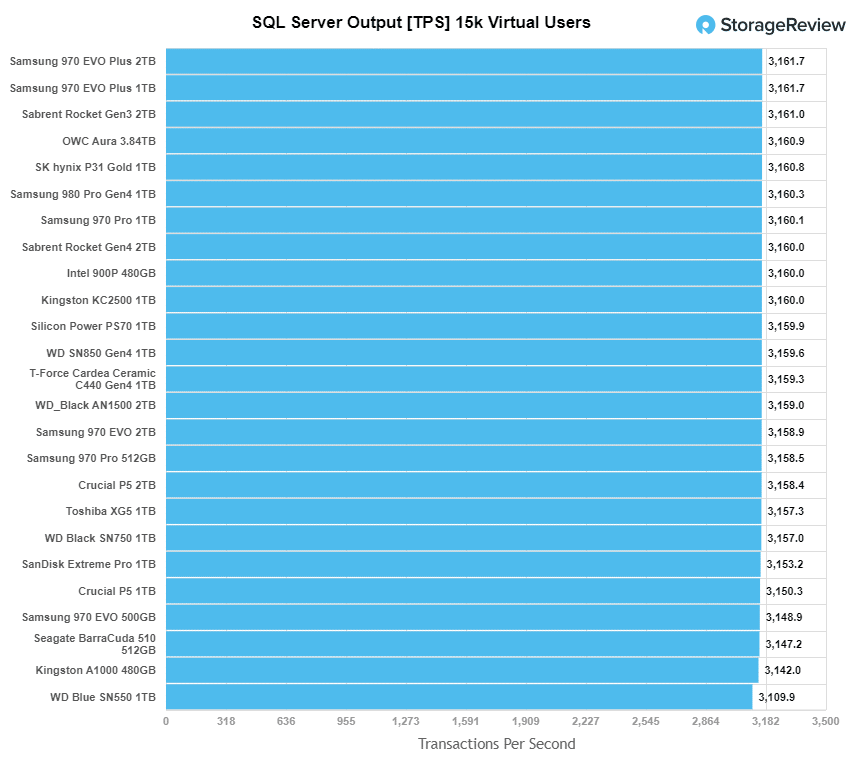
This article is clearly garbage, just from looking at the first graph: https://www.storagereview.com/wp-content/uploads/2020/11/Sto... .. that DB benchmark is most certainly bottlenecked on something other than IO, the full result range (including the one laggard drive) fits in a 1.6% range
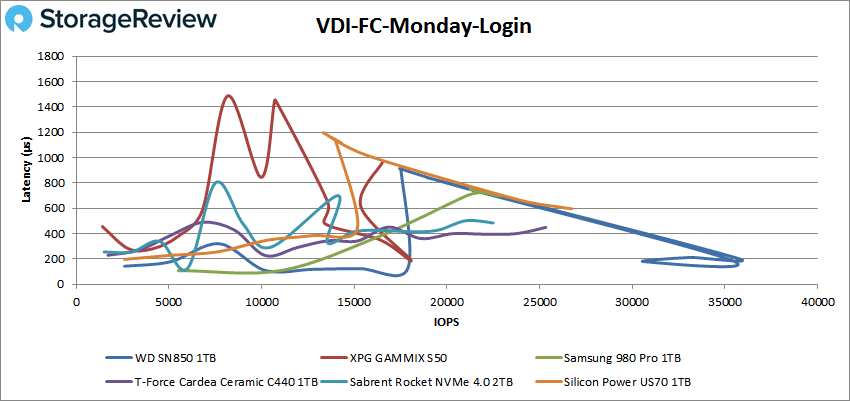
The really screwy Storage Review graphs are a result of a test with too few data points, Excel being "helpful" with overly complicated interpolation, and poor test setup.
I have some similar graphs in my reviews, eg. [1], but to get something halfway neat and legible I have to limit how many drives are plotted at once and ensure the test stops when the drive reaches its limits. I also don't try to run this kind of test with a write workload against consumer drives, because it would require either heavily preconditioning the drives with enough writes to get SLC caching out of the picture, or using a ton of idle time to ensure each data point tested started from the same amount of cache available.
On some enterprise SSD reviews where it is actually appropriate to test them with random writes for days on end, I have produced graphs like [2], which are kinda messy but could be worse.
There should be a name for the obscene guilt felt when shitting on something in public only for the original creator to turn up reminding you there is a human on the other side. Sorry!
Once the cache is full the sequential write speed drops to ~1200MB/sec, so your drive should survive till day 5 at least. In all seriousness though:
> We need to start expressing write endurance as a multiple of write speed
I can't tell if you're joking or not, but to be safe: no, we don't need to do that because there are virtually no realistic use cases where you'd continuously override data that you just stored on your persistent storage.
The synthetic tests are all conducted under Linux, with fio and io_uring. It's with every other operating system that you should be wondering whether it can keep up with this kind of hardware.
Please keep in mind that Linux is just an amateur operating system written by a college kid from Finland :) It has/had a lot of interesting bugs, like this one in the scheduler: https://www.ece.ubc.ca/~sasha/papers/eurosys16-final29.pdf
And that's 7 GB/s from _one_ SSD. Aggregate memory bandwidth on something like the Zen3 is roughly 40 GB/s. These are also first generation PCIe 4, plenty more to come.
Doesn't require a huge improvement before you end up in a position where you simply don't have the memory bandwidth or cycles to deal with more than one drive.
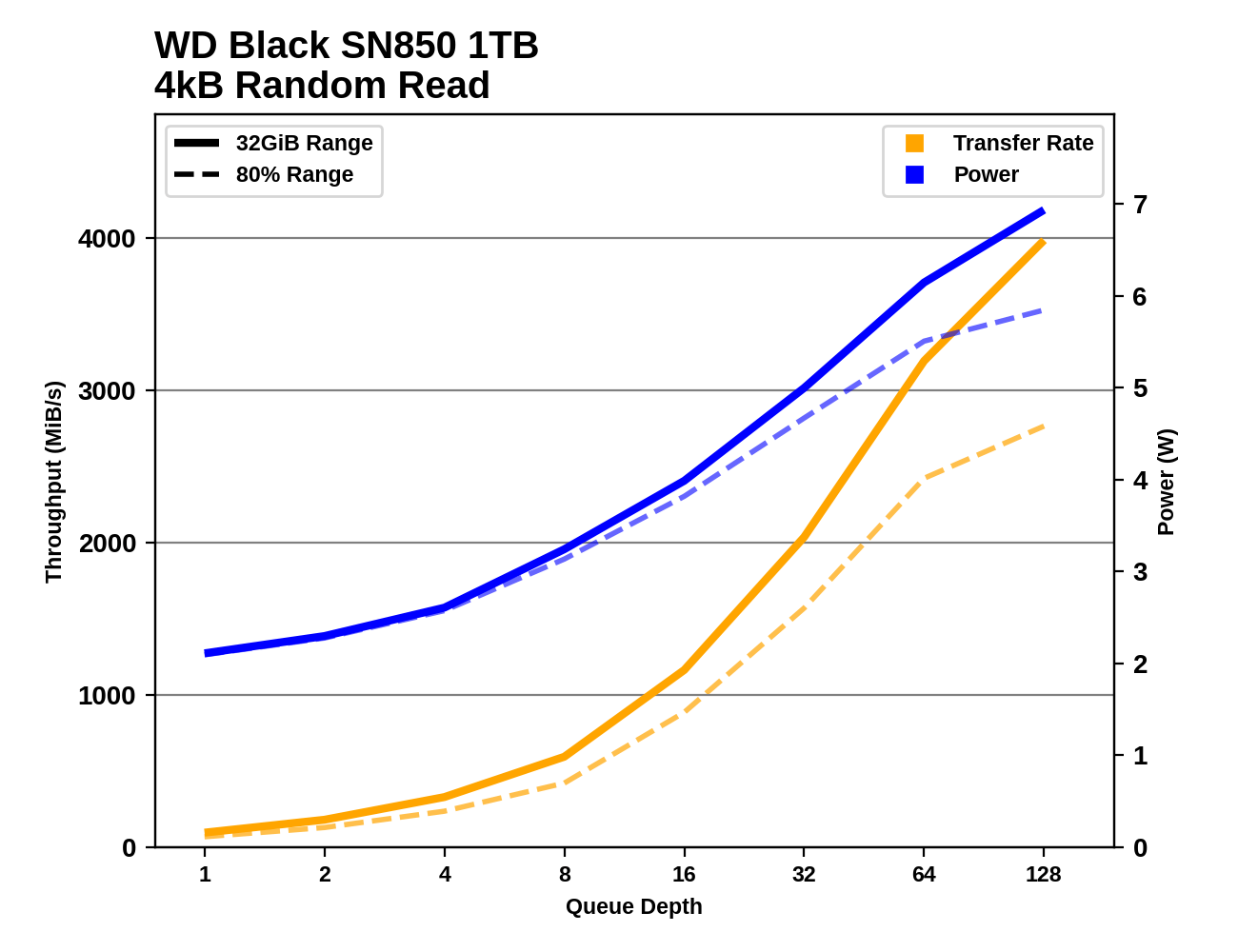
I suspect the Optane wins most of the benchmarks because of it's outrageously good low queue depth random read performance - that's very effective for software that's not written for modern NVMe SSDs which benefit from very high queue depths. Check out the 4k random read performance from the SN850 at high queue depths:
If you can keep the queues deep, it manages to beat the throughput of the Optane. You've got to design algorithms and data structures to exploit that kind of concurrency though.
a lot of M.2 2280 NVME SSD still being sold on the market are PCI-E 3.0. it is interesting to see its benchmarks against the samsung and other top tier competitors.
but look at the benchmarks for this drive versus the Samsung 980 Pro 1TB.
both are selling at $199 from newegg right now...
but the WD sn850 blows away the 980 pro in nearly every benchmark.
I still have a greater degree of trust in Samsung for reliability and greatly exceeding their specified write-endurances (torture tests of MLC samsungs from 3 years ago illustrate that for a desktop workstation, you would have to REALLY abuse them to ever run into the write endurance problem).
What I am really surprised by is the price of the enterprise ones (samsung PM1735, you can get a 3.2tb for like £600). Barely more expensive than consumers with massive performance (8GB/s read) and endurance. Not sure where is the catch.
The catch is that pricing and availability for grey-market enterprise drives is wildly inconsistent, and you often don't get a manufacturer's warranty. Also, enterprise drives don't use SLC write caching, so their peak write performance is usually substantially lower than on a consumer SSD. And not that it matters much for a desktop, but enterprise drives also don't do idle power management, so they stay pretty warm even when you're not using them.
It’s not just endurance. I wouldn’t use anything other than an older Samsung Pro (not an 850 Pro, before they went TLC), a Samsung Z, or an Intel
Optane for something like a ZFS slog or a hardware RAID write accelerator cache - they have unmatched latency for these applications which cruet came by via their technical choices and is independent of write throughout.
> but the WD sn850 blows away the 980 pro in nearly every benchmark.
I think they have some cache tuning differences, because while WD wins in many benchmarks by 30-40%, it losses the same 30-40% on long sequential writes.
I have no ssd expertise, so, can't comment why this could happen.
If the price point of the Optane is keeping consumers from embracing them, then why not look for another way to make something the consumers are willing to buy? That's kind of what WD does. They have a huge chunk of the consumer market.
It's a pattern I started long ago where I have one drive to hold OS install and program files and one drive to hold data. Bottlenecks on storage IO are less common with nvme but my recent build is a workstation that runs a bunch of VMs and also serves as a DAW. I thought it better for each drive to have its own PCIe lanes. I'm also working on a 10G LAN and didn't want a bottleneck during disk IO.
You could also have IO storms with so many VMs, what if windows update start while 10 VMs kick of Ubuntu auto updates while at the same time a DB starts a backup job? In that case I don't want my web browser to slow down.
You don't want a problem with a single drive to take away everything you have, like RAID0 does. The only good case for RAID0 is temp/buffer files that you don't cry if you lose.
Anyway non-RAIDed simple setup is also vulnerable to drive failure. So backup (and RAID1 if you need HA) is the solution, not non-RAID. RAID1 just make x2 failure rate.
Yeah, I've had bad luck with raid consumer/prosumer gaming motherboards. I do like raid on servers, my r430 cluster has PERC 730 raid cards, never had a problem.
There should be a benchmark for filling a drive 100%, then doing 4K random writes. I'm pretty sure this would kill any MLC/TLC/QLC drive at a few billion writes or less. It wouldn't kill Optane, which would probably remain performant as well, and possibly some SLC drives.
Both this drive and the 980 pro have a dynamic SLC cache. When there is a significant amount of erased space available, they will each sustain about 5000MB/s. This drops to about 2000MB/s as the SLC fills. The 980 pro hits a cliff at about 75% written. The SN850 requires less erased space, but I forget the exact point it cuts out.
The size of the dynamic SLC, when available, is roughly 1/3 of the erased space, with an upper bound.
If you don't need the capacity, set aside 30% of the drive in a partition you won't use, then use blkdiscard to erase it. Not only will this increase write performance, it may increase endurance. Increasing endurance with these drives is of interest because they are rated at 0.3 DWPD, compared to 1 DWPD with previous generation drives.
Taking over-provisioning to an extreme, I found that erasing a 980 Pro, then creating a 100 GB partition allowed me to overwrite that partition many times over at a sustained 5000 MB/s. This could be interesting for journaling, so long as you are ok with lack of power loss protection (unlikely for a journal) or cache flushes could be performed to ensure the data is on NAND, not just in DRAM.
But really, if you need to sustain writes at such a high rate, both of these are the wrong drive for endurance reasons. With optane stuck at PCIe gen 3, it may be great for low latency small blocks, but it won't exceed 3500 MB/s in a x4 NVMe form factor.
> If you don't need the capacity, set aside 30% of the drive in a partition you won't use, then use blkdiscard to erase it.
I assume this is the recommended method for over-provisioning nowadays?
I've no idea where -- as it's been several years ago now -- but I can recall recommendations to use the HPA for this. I have no way to know, for certain, whether it actually helps but that's what I used to do (setting ~25% of the drive aside in the HPA). Anecdotally, I've yet to have such an SSD die on me, although I'm not exactly torturing them either.
On NVMe drives, I don't think you generally have any control over the HPA. Samsung Magician (windows only) has an option to increase over-provisioning. It shrinks the partition that is on the disk and erases the free space.
Enterprise drives tend to allow namespace management. With such a drive you can delete the namespace that comes from the factory and create a smaller namespace or several smaller namespaces that have an aggregate capacity that leaves the desired over-provision space unallocated.
I hadn't looked at enterprise drives before, but the Samsung 983 DCT is affordable and available, for M.2 110mm slots. It does user over-provisioning[1] (among other Samsung drives), and is a good option for those looking for more endurance.
Over-provisioning is doable since more 15" laptops and motherboards are starting to have 2 NVMe slots, and you always could've gotten additional PCIe->NVMe slots for a motherboard.
If you're still after endurance, low latency and a lot of random writes for journaling or a Bazel compiler cache, it seems like the P4801X is your best bet now, if you've got a 110mm NVMe slot.
If you're talking about performance benchmarks they got that, it's under the "Sustained IO Performance" section. If you're talking about testing to see how fast it breaks, I really don't see the point because that type of workload pretty much never happens in real life, especially for consumer SSDs.
I think people filling up drives and then making space as needed happens more often than one might think. It's probably most common on phones/tablets, but even I only do remote backups once a partition is 80% or so full, and at times I'll just delete the largest files I've managed to download. I over-provision, but for those that don't over-provision their SSDs, and run them on the fuller side, they might go through the TBW rating quicker than others who don't. This test would measure the quickest such outcome for each SSD.
Thanks for the link, it's nice to see such results from 256GB SATA drives (No drive dying before 600TBW, and the 840 PRO going up to 2.4PBW, I have a 850 PRO in a laptop myself), but it would still be interesting to see similar tests for NVMe drives.